Alright, let’s cut to the chase: if you’ve ever stared at a resin 3D printer on a shelf, wondering if it’s really as intimidating as all the online rants make it out to be, this post is for you. I’ve been on the ground with resin printers for years—started as a hobbyist, then moved into running a small supply side that works with everyone from first-timers to industrial designers—and the #1 question I get isn’t “how fast can this print?” It’s “what the hell is the learning curve here?” Let’s break it down real, no-fluff style. Resin 3D Printer
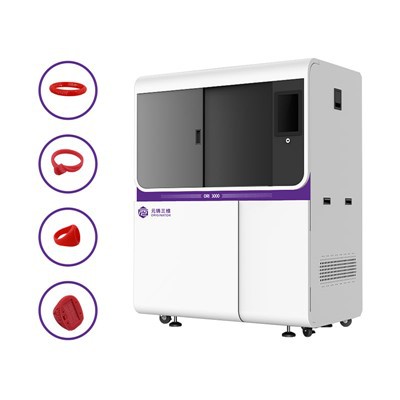
First, let’s level set: the learning curve isn’t a straight line. It’s more like a rollercoaster with a small, steep first hill, a flat middle stretch, and then a gentle upward slope that tapers off once you’re past the initial chaos. Most people I talk to either bail at the first messy print or get way too cocky too fast—so let’s call out the exact phases, how long each takes, and the stuff no one tells you (especially from a supply perspective).
The first phase: The “Oh Shit, I Broke My First Print” Phase. This is the steepest part, and it lasts about 7 to 10 hours of hands-on time. Wait, hours, not days—because this isn’t like FDM (the cheap plastic extruder printers) where you load a filament and hit print. Resin printers use UV light to cure liquid photopolymer, so every tiny setting can derail a part. Let’s be specific: when a new user unboxes their printer, the first thing they’ll do is slice a test file (most use free tools like Chitubox or Lychee Slicer, which we supply free tutorials for) and hit “print.” What usually happens? Their first print has half the part missing, it’s stuck to the build plate so bad they snap it, or the whole thing is blobby because they forgot to level the resin tank or set the exposure time wrong.
I’ve seen this so many times: a customer will message us at 9 PM panicking because their Benchy print is a goopy mess. The fix here isn’t “read the 50-page manual” (no one does that, let’s be honest). It’s checking two things first: build plate leveling (most resin printers need it to be micro flat—like, you can’t just eye it; use the paper test, not the “this looks fine” test) and exposure time (for standard resin, it’s usually 2 to 3 seconds per layer, not 5 like a lot of random YouTube videos say). This phase sucks, but it’s short—because once you nail those two, you stop ruining every print. Pro tip from our team: we include a free cheat sheet with every printer we ship that lists the core settings for common resins, so new users don’t have to Google until their eyes burn. That small help cuts this phase by like 2 hours, easy.
Next phase: The “I Can Print Decent Stuff But It’s Buggy” Phase. This is the flat part of the curve, and it lasts about 2 to 3 weeks, or roughly 10 to 15 prints. Now you’re not making goop—your test parts look like actual objects, but you’re still dealing with weird, random issues: supports breaking mid-print, resin seeping into places it shouldn’t, or layers that are slightly misaligned. This is where most people start to get frustrated and think resin is garbage, but it’s just the middle of the learning curve.
The big thing here is mastering supports. FDM supports are easy—they’re plastic, you just pull them off. Resin supports are fragile, and if you place them wrong, they either don’t hold the part (so it falls into the resin tank) or break when you try to remove them. I see new users messing this up all the time: they use the default support settings in the slicer, which work for some parts but not all. What they don’t know is that for overhangs steeper than 45 degrees, you need extra support points, and you should use a sturdier support density for parts that have thin features (like ears on a figurine). Also, resin handling is a big one here—you can’t just pour old resin back into the bottle when your print is done, because it’s partially cured. Waste resin is real, but if you filter it properly (we sell mesh filters for this) you can reuse most of it, which saves money and reduces mess. This phase is about trial and error with small parts—printing tiny keychains, mini action figures, whatever—until you stop getting support fails. Our customers who stick with it here usually start moving to more complex parts after that, so it’s a necessary stretch.
Then comes the “I’ve Got This” Phase. This is when you’re 4 to 6 weeks in, have 20+ prints under your belt, and you’re not panicking when a print takes an hour. You know how to adjust exposure for different resin types (like tough resin vs. detail resin), you can fix a random layer shift by tweaking the Z-axis offset, and you barely have to look at the cheat sheet anymore. This is where the curve starts to flatten out, because most of the core skills are second nature.
But wait—this is where a lot of people hit a plateau that I don’t talk about enough. It’s the “I can print good parts, but not industrial-grade ones” wall. If you’re a hobbyist, this is all you need. But if you’re a maker, small business, or even someone prototyping a part, you’ll start wanting to dial in details: layer line visibility, surface finish, consistency across large parts, and reducing print time. That’s where the gentle upward slope comes in—this isn’t hard, but it’s a whole other layer of learning. For example, if you want a smooth surface, you might need to post-process the parts (sanding, UV curing, polishing) instead of just pulling them off the printer. If you want to print larger parts without warping, you have to adjust your slicer settings to add more base support and slow down layer time for the first 10 layers. This is the stuff that separates the casual users from the ones using resin printers for actual projects, and it takes another 1 to 2 months of practice.
Now, let’s get real about the myths that make the learning curve feel way worse than it is. First myth: resin printers are way more complicated than FDM. No—FDM has its own learning curve (like not clogging nozzles, getting filament to stick), but resin’s curve is just concentrated in the first few weeks because it’s a different technology. Once you get past that initial stretch, it’s actually more consistent for small, detailed parts. Second myth: you need a engineering degree to use one. Nope—we have hobbyists in their 60s using our printers to make model trains, college students using them for art projects, and small business owners printing jewelry molds, and none of them have a tech background. The key is having good resources, which is why our team puts out free weekly Q&As for customers, plus video tutorials that skip the jargon.
Also, from a supply perspective, the biggest way we reduce the learning curve is by pre-calibrating every printer before it ships. A lot of cheaper resin printers come from the factory barely leveled, which means new users have to waste hours fixing that first. Our printers leave the shop with the build plate perfectly level, the resin tank aligned, and a test print that’s already cured to make sure everything works. That cuts the first phase by like half—no more staring at a goopy first print because the factory messed up the leveling. We also include a 30-day support line, not just a manual—so if you message us at 2 AM with a print fail, one of our techs will walk you through it in 5 minutes, not send you a 10-page PDF.
Wait, let’s address the elephant in the room: what if you’re someone who just wants to print a few parts for a project, not become a resin expert? The learning curve is way shorter for you. You don’t need to master post-processing if you just want a quick prototype. You can stick to standard resin and the default slicer settings for most parts, and skip the deep dive into advanced settings. A casual user can be printing decent stuff in 1 to 2 days, no problem. The curve only feels steep if you’re overthinking it, or if you’re trying to print a complex part on your first try.
Another thing I’ve noticed: the learning curve changes depending on the printer’s size and specs. A small entry-level resin printer (like our 4K model) is way easier for beginners than a big industrial one. The entry-level models have simpler settings, smaller build plates (less room for error), and less complicated curing systems. Once you nail that, moving to a larger printer is just adding a few new settings, not starting over. That’s why we recommend entry-level models for people just getting started—no need to jump into something overwhelming.
Let’s wrap this up with a quick, honest summary of the timeline, so you can set expectations:
- Phase 1 (First 7-10 hours): Messy prints, panic, basic setting fixes. Done when your test Benchy is recognizable.
- Phase 2 (Next 10-15 prints, 2-3 weeks): Support fails, random glitches, small frustrations. Done when you print 3 good parts in a row.
- Phase 3 (4-6 weeks in, 20+ prints): Consistent, no panic. Hobbyist level.
- Advanced Phase (2-3 more months): Dialing in fine details, large parts, industrial-quality prints.
If you’re on the fence about jumping in, don’t let the “steep first hill” scare you. Every single one of our long-term customers told me they almost returned their printer in the first week, but stuck with it and now use it for weekly projects. The learning curve isn’t about being perfect—it’s about fixing one small problem at a time.
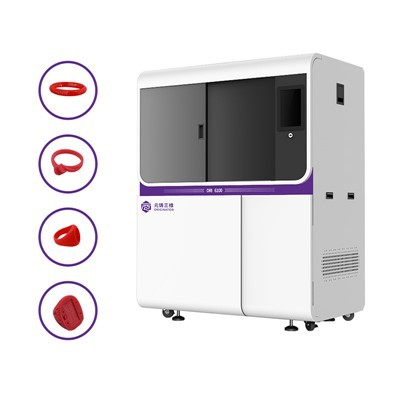
Speaking of sticking with it: if you’re ready to stop Googling random resin tips and start getting consistent, high-quality prints for your project, our team is here to help. We don’t just sell printers—we help you figure out what settings work for your needs, send you free test files, and support you every step of the way from unboxing to your first successful custom part. Whether you’re a hobbyist looking to make figurines, a small business prototyping parts, or anything in between, we can walk you through the next steps without all the jargon. Reach out to our team to learn more about our models, get a custom setup guide, and stop stressing about the learning curve.
Jewelry 3D Scanner References:
- Chitubox Official Documentation.
- Lychee Slicer User Guide.
- Additive Manufacturing: Resin 3D Printing Basics, 2022.
- Resin 3D Printing for Beginners: A Practical Guide, Maker Media, 2023.
Hangzhou Originator 3D Technology Co., Ltd.
Hangzhou Originator 3D Technology Co., Ltd. is one of the most experienced resin 3d printer manufacturers and suppliers in China. With abundant experience, we warmly welcome you to wholesale high quality resin 3d printer made in China here from our factory. Contact us for more details.
Address: Room 403, Building 2, Block B, Heda Incubation Park,No. 452, 6th Avenue, Xiasha, Qiantang District,Hangzhou, Zhejiang, China
E-mail: Sales@originator3d.com
WebSite: https://www.originator3d.com/
